System setup
Platform access, Origination Data Requirements, and Servicing Data Requirements before you call the APIs
On this page· 9 sections
A checklist for what Figure provides and what your team provides before calling the Origination Data and Servicing Data APIs in test or production.
- Business Onboarding
- Account Configuration
- Originator Authorization
- Servicer Authorization
- Connectivity
- Origination Data Requirements
- Servicing Data Requirements
Business onboarding #
You will work with Figure to get invited for Business Onboarding to collect KYB/KYC information.
Then onboard with Figure Markets to create your wallet for transacting on Provenance.
Account configuration #
Send the IP addresses of every system that will call the gateway, for test and production, to dart-engineering@figure.com. Once allow-listing is complete, validate the configuration with the Test IP Debugger (test) or IP Debugger (production).
Test and production use separate API keys and Figure Participant IDs. They are issued at different steps:
Using your Figure Participant ID: When you service your own loans, set servicerId to your Figure Participant ID for that environment on Origination Data and Servicing Data calls. On onboard requests, omitting originatorId defaults to the Figure Participant ID tied to your API key in the same environment.
Store API keys securely. If a key is leaked, contact Figure so it can be invalidated and rotated. Send the key on every partner call in the apikey header.
Originator authorization #
This step applies to partners who onboard loans on behalf of another originator—for example a loan origination system (LOS) or platform that submits asset onboarding for the lenders or originators you serve. If every loan in the request is for your own organization, omit originatorId on each loan; it defaults to the originator identity on your API key and you do not need third-party originator setup below.
When the originator is a different organization, set manifest.loans[].data.originatorId to that originator's Figure Participant ID on each loan.
Send Figure a list of originator names (for example legal or doing-business-as names) for the lenders on whose behalf you will onboard loans. Figure sends each originator a Business Onboarding invite—the same KYB/KYC flow described under Business Onboarding—so they can create their Figure accounts. After each originator completes onboarding, Figure provides that originator's Figure Participant ID for POST /api/onboard. Set manifest.loans[].data.originatorId to the Figure Participant ID that matches the originator on that loan.
Figure keeps an allow list of originator Figure Participant IDs that your API key may represent. If /onboard returns an error that the requestor is not authorized for that originator, the pairing is not configured yet. Email the originator names or Figure Participant IDs you intend to use to dart-engineering@figure.com.
Servicer authorization #
This step applies to originators who onboard loans not serviced by their own organization. If you originate and service the same loans, use your Figure Participant ID from Account Configuration on manifest.loans[].data.servicerId and on POST /api/servicing-tape—you do not need third-party servicer setup below.
Third-party servicer#
When a third party services the loans, send Figure a list of servicer names (for example legal or doing-business-as names). Figure can create accounts for those servicers and return each servicer's Figure Participant ID. Use the Figure Participant ID that matches the servicer on that loan on POST /api/onboard and POST /api/servicing-tape.
Figure keeps an allow list of servicer Figure Participant IDs that your API key may onboard. A 403 on create means that pair is not configured yet. Email the servicer names or Figure Participant IDs you intend to use to dart-engineering@figure.com.
Connectivity #
After you have a test API key, call health:
A successful health check means the allow list and the key are in place.
Origination data requirements #
Complete these steps with Figure before calling POST /api/onboard in production:
- Figure provides the Figure Data Dictionary with the origination data fields for your
loanType. - You provide:
- Your Partner Data Dictionary (optional
manifest.dataDictionaryor an offline document) - Sample loan origination data
- A file containing sample underwriting guidelines for the product
- Samples of the loan documents
- Your Partner Data Dictionary (optional
- You send a test onboard request in the test environment using synthetic data, or production-like data that has been scrubbed of personal information (names, addresses, government IDs, account numbers, and similar PII). Figure uses that submission and the file containing the underwriting guidelines to generate an AI Adaptor mapping proposal.
- Figure reviews the proposed field mapping, follows up with your team if anything needs clarification, applies manual mapping corrections or overrides as needed, and approves it for test and production use.
- Figure processes the submitted test request: the source data is transformed using the approved mapping, each loan is onboarded to the Provenance testnet, and the NFTs appear in Portfolio Manager in the test environment.
The Figure Data Dictionary lists the origination values Figure is set up to receive for that loanType. It does not require you to rename columns to Figure field names. Not every dictionary field is required on every loan, but include as many values as you can. If your system has fields that are not on the dictionary, include those as well—they may be retained with the submission for possible future standardization.
AI adaptor#
Figure uses the AI Adaptor, an internal Figure tool, to propose a mapping from your source schema to Figure's standard model. Figure manages the adaptor, the proposal, and the approved mapping. The proposal lists Figure standard fields (data_point), your source columns (source), how values are transformed, and a confidence score. Figure reviews the proposal, follows up when a row needs clarification, applies manual mapping corrections or overrides as needed, and approves the mapping for test and production use.
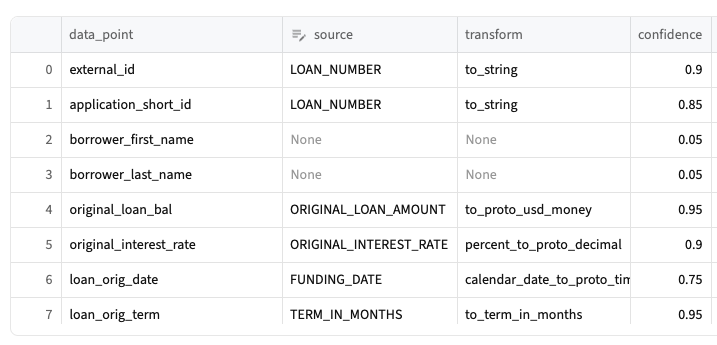
Tell Figure before changing a source field's name, type, format, or meaning. Figure will review the change and approve a new mapping version before the changed feed is used in production.
Source fields without an approved Figure mapping are still accepted and retained with the source submission. They are not automatically available in Figure's standardized reporting.
Servicing data requirements #
Complete these steps with Figure before calling POST /api/servicing-tape in test or production:
- Figure provides the Figure Data Dictionary with the servicing data fields for your
loanType. - You provide:
- Your Partner Data Dictionary
- A sample CSV of servicing data
- Both teams agree on the CSV layout and delivery schedule, such as daily or weekly.
The Figure Data Dictionary lists the servicing values Figure is set up to receive for that loanType. It does not require you to rename columns to Figure field names. Include as many dictionary fields as you have on each row. If your system tracks servicing fields that are not on the dictionary, confirm with Figure whether to include them on the tape.
Origination and servicing use separate mapping profiles because they represent different datasets, even when some field names are shared. The AI Adaptor used for origination does not configure servicing mappings.
Tell Figure before changing an agreed servicing column's name, type, format, or meaning. Figure and your team update the servicing field mapping when the schema changes.
See Servicing Data for upload format, sample CSV, and status polling.